Thanks all, have successfully cut my word clock in card and sheet of acrylic to match! superb.
going to document project here https://discourse.southlondonmakerspace.org/t/word-clock
Thanks all, have successfully cut my word clock in card and sheet of acrylic to match! superb.
going to document project here https://discourse.southlondonmakerspace.org/t/word-clock
@tim and @peter_hellyer are now trained up as trainers for the laser. Induction sessions from our new inductors to follow shortly 
with that in mind, see https://discourse.southlondonmakerspace.org/t/laser-cutter-induction-tuesday-27th-oct
Is there a reason for metal being on the banned list? Is not something the cutter is capable of cutting or etching or is it another reason?
You need a laser about 10x more powerful to cut metal. You can etch some metals if you spray on a special compound first, but we haven’t tested it yet (it’s rather expensive - about £50 a can).
You can also etch on the coloured surface of anodised aluminium, but again we haven’t test it yet.
Thanks
Going through the manual and it mentions not cutting certain metals but gives very little info otherwise.
My friend who is a DT teacher etches anodised aluminium on hers and it looks really good.
I’ve also sprayed brass with matt black paint and etched that as an acid resist for, er, etching…
Yeah this should work well. Some metals change colour too.
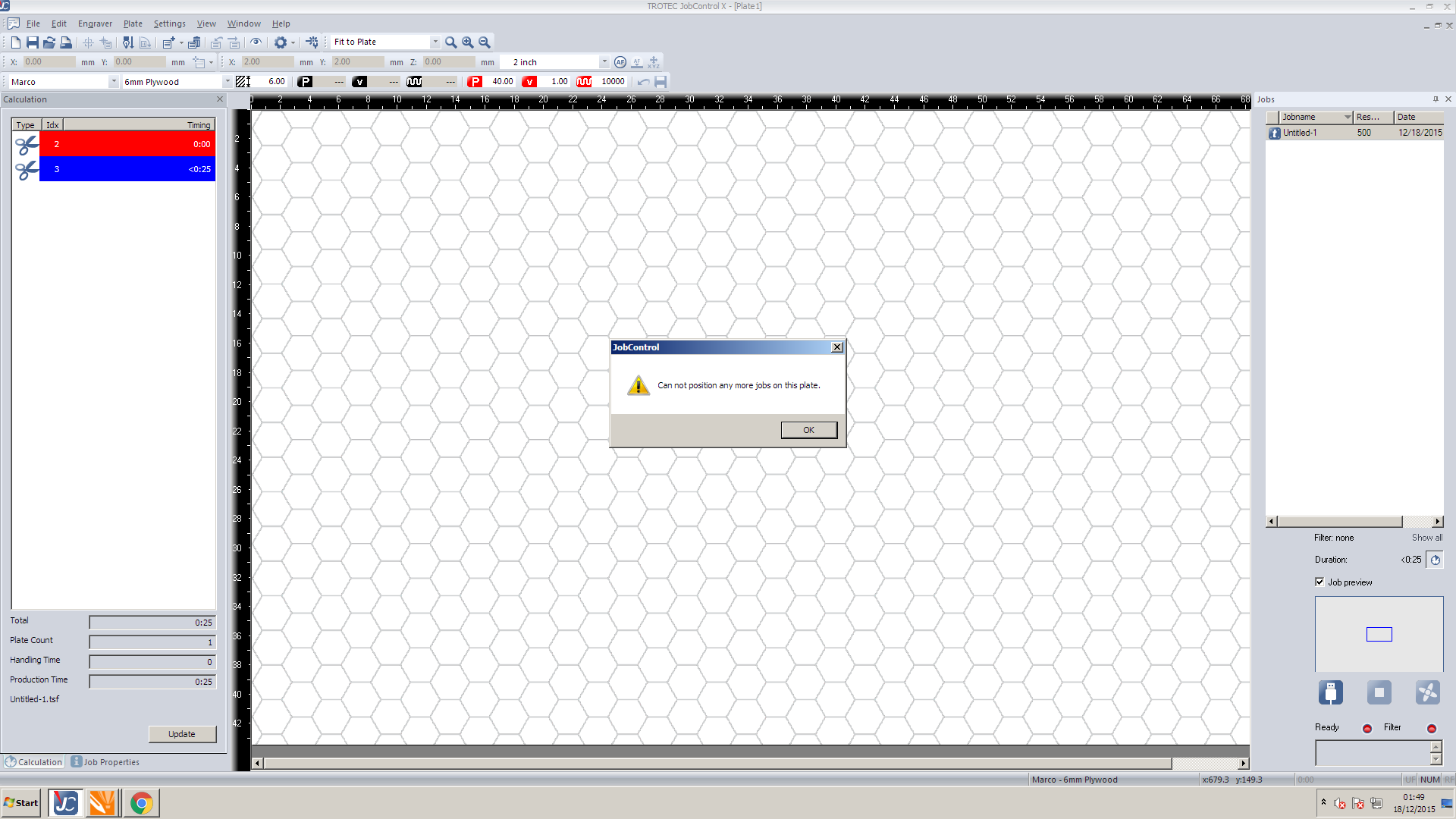
OK, I’ve spent over 2 hours trying to figure this out…
I printed a few things earlier that went well. Then loaded a fairly large print that is 570x337mm this loaded in to Jobcontrolx with out a problem.
I then went back to CorelDraw to change one of the colours and afterwards got this error.
I’ve removed all the jobs from the job list but soon as i print I get this error even if I print a small block from Corel or Inkskape
Google searches suggest that the page size is incorrect.
I’ve played around with the page sizes and this has not helped.
I’ve rebooted the system and power cycled the laser cutter.
Any Ideas anyone?
On other news Just for interest sake the lens was fairly dirty when I got to the machine.
From the logs, @pmcnv used it last. Patrick - how did the lens look when you used it?
@Marco_Pagliari Could you elaborate on what you mean by fairly dirty?
The error is caused by the page size exceeding the bounds of the plate size in JobControl. You need to check in the top left of the print preferences that it’s taking from Document in CorelDraw, or that the selected size is not bigger than it should be.
I was just logging on to type this up, I used it yesterday morning and had to clean the lens before using the machine as well. It wasn’t so much covered in dust ‘dirty’ etc but the glass lens was covered in evaporated water residue marks that looked like it they where left over from the evaporated cleaning solution on the lens. I assumed the cleaning solution would have been made to evaporate clear and not leave any marks which makes me wonder what is the residue that has it been deposited after using it to clean
The water residue is normally a sign of:
a. Too much cleaning fluid
b. The dirt has been smeared around, not lifted off.
We need to know from @Marco_Pagliari what the dirt was like, but if it was just water residue then thats fine, but it should be cleaned until optically clear, not left wet to dry in the machine. Where as if it was sooty or dusty it would suggest that someone didn’t clean it after extensive use. Or that the space it too dusty and the machine is blowing dust on it, the space was incredibly dusty as a result of the construction work, concrete dust mostly…
On a not unrelated note, Saturday, when do you want to do training? @unknowndomain
15:00?
Awesome.
cloudy. May have been residue left from cleaning. not like the last time it was burnt. any way I cleaned it before I used it and after may be interesting to see how it looked after that in the morning.
I did tell the print driver to pull the information from Corel. interestingly enough it was just using A4 before this started giving me problems. I also set Corel to use the dimensions from Jobcontrol for its page size after I was unable to print.