There are no regular opening hours.
Access depends entirely on 2 things:
Shutter access holders placing a booking on the calendar
Shutter access holders opening the space without declaring it on the calendar
In the case of today, @Willybood created the entry, but then cancelled their hosting (crossed out their name).
They left a message on the post, but that wasn’t visible on the calendar.
This left a booking without a person to open up.
They should have cancelled the whole booking entry and informed anyone who had put their name down for a tool.
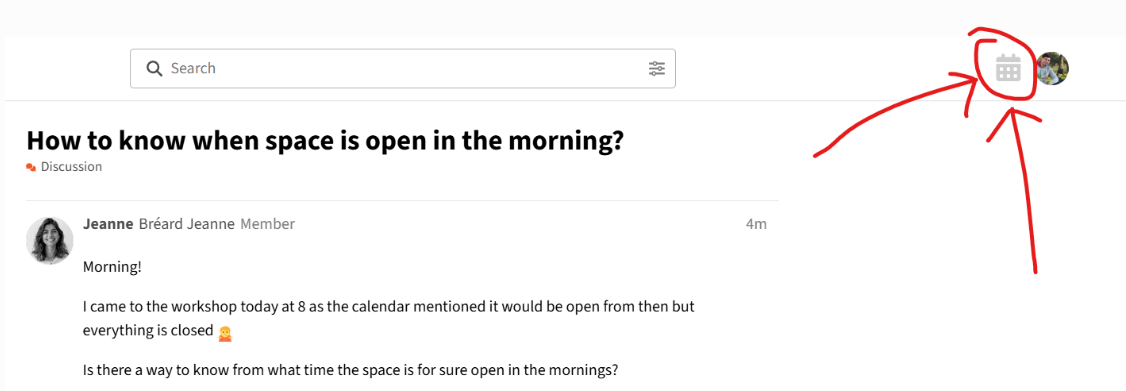
When the space is open, that little calendar icon is supposed to turn green.
Please bear in mind that this is not a failsafe system. I am not entirely sure how that icon works, something linked with the use of the tools and the tool control system that we have.
Occasionally it could be displaying the wrong information.
The calendar bookings are a much better way of working out if someone with shutter access is hosting a session, but again, no paid staff means that sometimes circumstances change and the host doesn’t show up. Annoying but there is nothing we can do, everyone can have mishaps.
I don’t know how long you have been a member, but this post may be worth a read, getting shutter access is not awfully difficult.
Sorry about that, I was worried that if I deleted the entry in the calendar it would have disrupted the bookings already placed in it. Next time I’ll do so.
It is absolutely okay, as you said it is all voluntarily ran so I’ll happily adapt
I didn’t know about the green icon, it is a great way to know (although it can be faulty, that’s noted)
I’m quite a fresh member, hence my regular questions I’ll give a read to the link you’ve attached.
I appreciate you taking the time to explain it all clearly, thank you for that!


 I’ll give a read to the link you’ve attached.